 tuneit.
The common baritone targets are D–G–B–E
A baritone ukulele commonly uses D–G–B–E from string 4 to string 1, with the usual low-D setup rising from the lowest pitch to the highest. These are the same note targets as the four highest strings of a standard six-string guitar. They differ from the G–C–E–A tuning commonly used for soprano, concert, and tenor ukuleles.
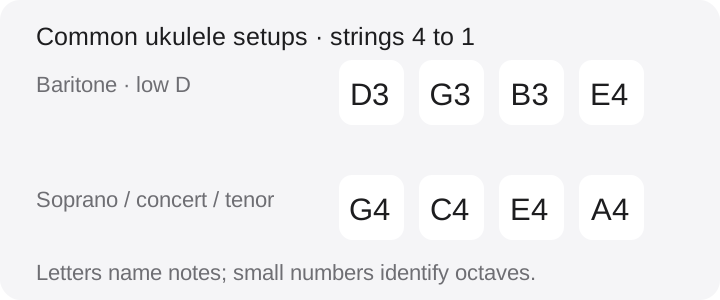
Some instruments use alternate or reentrant setups, so the name “baritone” alone does not guarantee every octave. Check the maker’s instructions and string packaging. The numbers in D3 and E4 are octave labels; the string numbers still run from 4 to 1.
Confirm the instrument before selecting a preset
If your ukulele is new to you, look for a model label or ask the seller how it is strung. A common ukulele preset may expect G–C–E–A even when you are holding a baritone. Choosing that preset does not make its targets suitable for your physical strings.
Do not tighten a normal D–G–B–E string set toward G–C–E–A just to satisfy an app. Different tunings can require a suitable string set and instrument setup. If the string feels unexpectedly tight or its pitch is far from the expected range, stop and check the setup rather than taking a large guess at the peg.
Tune one open string at a time
- Choose a baritone D–G–B–E preset if your tuner has one. Otherwise use a suitable chromatic mode with the intended notes and octaves.
- Find string 4 and confirm its peg. Sound the open D while keeping the remaining strings quiet.
- Make a small adjustment, pluck again, and wait for a stable reading. Confirm the register as well as the letter.
- Repeat for strings 3, 2, and 1: G, B, and E.
- Recheck all four strings, then play a simple pattern that uses each one.
If your tuner shows only letters, compare with a dependable reference for the usual low-D baritone setup. A centered D can belong to more than one octave. You need the target that matches your string set, not just a matching character on the screen.
Familiar shapes can produce different chords
A chord shape learned on a G–C–E–A ukulele can sound a different chord when played on a D–G–B–E baritone. That is a tuning difference, not necessarily a mistake in your fingering. Use chord diagrams or lessons explicitly written for the baritone setup you are using.
For example, the common G–C–E–A shape with only string 1 held at fret 3 produces C major. On a low-D baritone, the same frets produce G major. A shape is a set of finger positions; the open-string notes determine what pitches those positions make. Check the chord name as well as the diagram.
Use an app that supports your intended targets
Before downloading a tuner specifically for this task, check its current platform listing or settings for baritone targets, a suitable custom tuning, or chromatic operation. Do not assume the Apple and Android versions have identical presets just because they share a product name.
The Android Ukulele Tuner listing describes alternate and custom tunings, but does not explicitly name a baritone preset. Confirm the available settings before relying on it for D–G–B–E. A tuner can help measure your notes; it cannot identify an unknown string set or decide whether changing it is appropriate.